A stakeholder pitches you an idea. It sounds promising, but the details are fuzzy. You have questions about the target user, the problem being solved, and whether the proposed solution would work. At the same time, there's pressure to move quickly, roadmap space is limited, and cross functional partners all have different expectations.
Before you commit engineering time or add anything to your roadmap, you need a way to turn that concept into something concrete and comparable to other opportunities.
A lean business canvas helps you do that. It brings structure to early ideas, highlights unclear areas, and shows what needs validation before a concept deserves deeper exploration. Product teams use canvases for idea triage, discovery planning, and the conversations that shape prioritization.
This guide explains how product managers use the lean business canvas, when it has the most impact, and how to create one effectively.
What a Lean Business Canvas Means for Product Managers
A lean canvas gives PMs a quick way to understand whether an idea's worth exploring.
Most descriptions of the lean canvas focus on startups. Product managers work in a different environment. You're deciding whether an idea deserves time, attention, and resources within a competitive roadmap.
The canvas becomes a practical way to clarify the problem and support early conversations with design, engineering, and leadership. It also helps PMs prevent weak ideas from advancing simply because they're exciting or have momentum.
A lean canvas sets the stage for early insight. Teams still follow it with evidence and feasibility work to make informed decisions.
How the Lean Canvas Differs in a Product Context
Product teams use the canvas to evaluate ideas in context of strategy, capacity, and opportunity cost.
The Business Model Canvas describes how a company operates. The lean business canvas focuses on the unknowns surrounding a potential problem and solution.
For PMs, this matters because early product work requires comparing ideas quickly and making choices that support company goals. A lean canvas offers enough structure to guide that thinking without the overhead of full briefs or PRDs.
The canvas also scales well across seniority levels. Leaders use it to discuss trade offs and see where more discovery is needed.
Why Product Managers Rely on Lean Canvases
PMs use the canvas to create clarity in situations where the stakes are high and alignment can shift.
Product managers deal with constant pressure to deliver outcomes, handle competing priorities, and make decisions with incomplete information. A lean canvas helps bring structure to these situations. It gives PMs a quick way to compare opportunities, reduce risk by making assumptions visible, and build shared context across teams without heavy documentation.
A few examples show how PMs use it in everyday work.
Evaluating competing roadmap pitches
A PM receives several ideas from different departments and needs an unbiased way to compare them. Creating a lean canvas for each idea reveals which ideas have a real customer problem and which ones rely on untested assumptions.
Running a cross functional planning session
A PM brings a draft canvas to a conversation with design and engineering. Instead of debating solutions too early, the team reviews the problem, the customer segment, and the expected outcomes. The canvas helps everyone see the same picture and agree on the next steps.
Supporting conversations with leadership
A PM uses a lean canvas to show which product directions have the strongest potential and which require more discovery. Leaders get visibility into risks, assumptions, and the strategic rationale behind prioritization.
These patterns highlight why the canvas fits so naturally into modern product work. PMs need tools that support faster validation, clearer comparison across opportunities, and repeatable approaches to early discovery. A lean canvas meets those needs by helping teams focus their efforts, reduce uncertainty, and work toward strategic clarity without slowing down.
The Nine Sections of the Lean Business Canvas for PMs
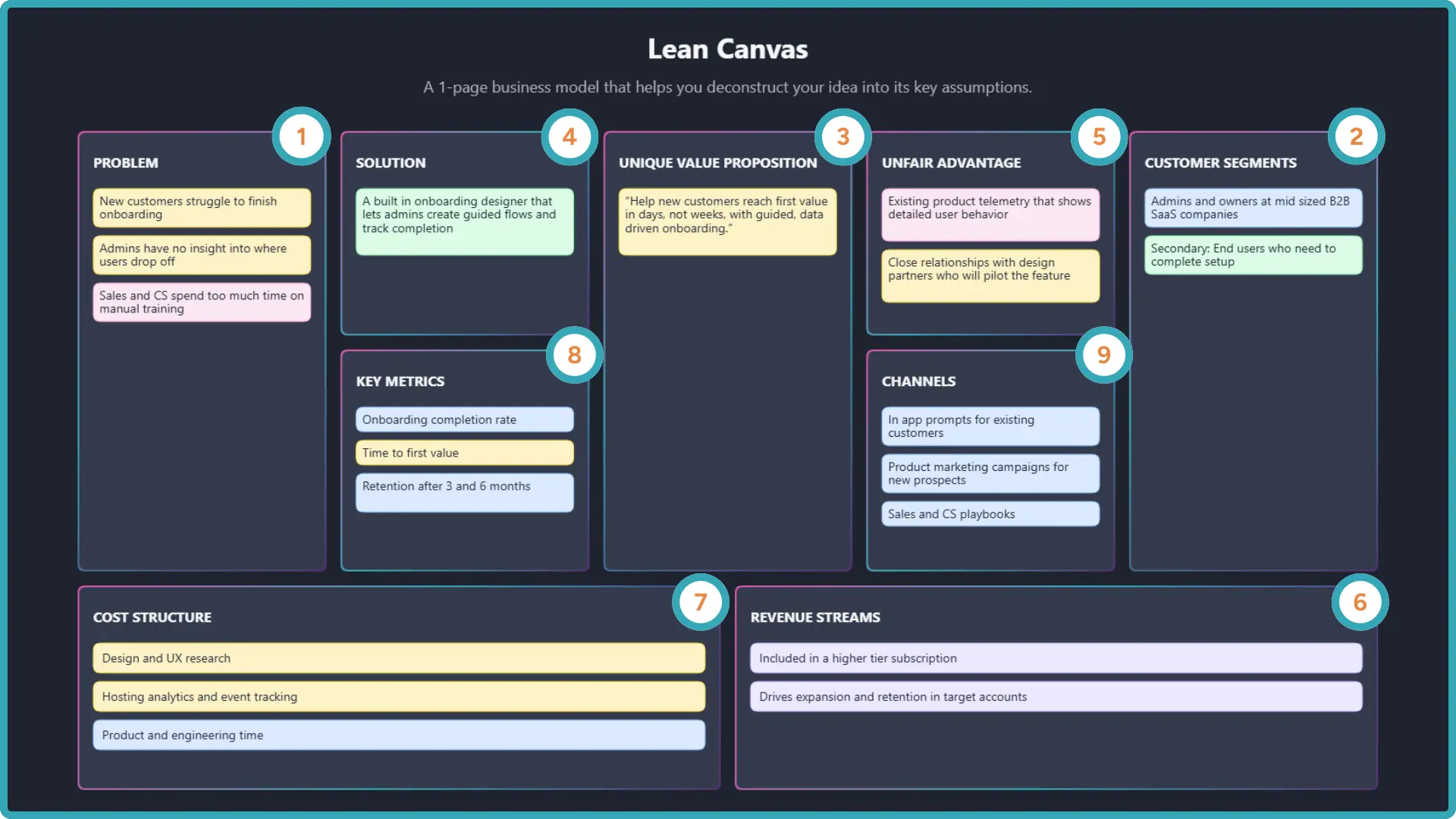
Each section helps PMs build an informed picture of the opportunity. The visual canvas helps PMs identify which assumptions need validation first.
1. Problem
Define the core user or customer problem. Clear articulation here prevents teams from solving superficial symptoms.
2. Customer Segments
Describe who experiences the problem. Behavioral, industry, or job based segmentation helps PMs target early research.
3. Unique Value Proposition
Explain the value your product or feature aims to deliver. This becomes the seed for positioning and early messaging.
4. Solution
Capture the simplest version of the solution worth testing. Early concepts or low fidelity prototypes often tie to this section.
5. Channels
List how users discover or access the product or feature. This includes in product flows, lifecycle messaging, sales enablement, or customer success moments.
6. Revenue Streams
Describe business impact. This might include pricing tier movement, feature based monetization, retention improvements, expansion potential, or meaningful cost savings.
7. Cost Structure
Define major cost categories. Examples include engineering complexity, design and research needs, required integrations, or ongoing maintenance burden.
8. Key Metrics
Choose metrics that reflect user behavior and help answer whether the idea's working. These guide experimentation.
9. Unfair Advantage
Document anything that strengthens your odds of success, such as proprietary data, expert insight, or a strategic partnership.
How Product Teams Use the Canvas During Discovery
The canvas becomes a guide for what to learn next.
Once a PM drafts a canvas, it often becomes the foundation for discovery, guiding early exploration. Each section highlights questions the team needs to answer through interviews, research, or quick experiments. As those insights surface, the PM updates the canvas so it reflects the team's latest understanding.
This keeps everyone focused on the most important uncertainties and helps the team move from assumptions to evidence with clear intent. PMs still rely on customer evidence, feasibility input, and business strategy to make final calls.
How the Lean Canvas Fits With Other Product Discovery Tools
PMs rarely rely on a single framework. The lean business canvas works alongside tools that deepen specific stages of discovery.
A Value Proposition Canvas strengthens understanding of customer pains, gains, and jobs to be done. An Opportunity Solution Tree helps PMs explore multiple paths to a desired outcome before choosing a direction.
Used together, these tools support structured discovery and strong decision making.
Best Practices for PMs Creating a Lean Canvas
A few habits make the canvas a more effective strategic tool.
- Start with the problem and customer segment
- Keep entries short and grounded in evidence
- Treat each section as a hypothesis
- Choose metrics tied to behavior
- Refresh the canvas after every learning cycle
- Use a digital workspace that supports flexible iteration
Once you have a solid habit of drafting and revising canvases, the next step is using a tool that makes it quick to sketch, visualize, and share them with your team.
Moving From Framework to Application With Canvas Creator
Product work moves quickly, so tools should support fast drafting and iterative thinking.
Once you understand how the lean business canvas supports early decision making, it helps to have a space where you can build and refine canvases without wrestling with generic slide tools or whiteboards. Many PMs want something that lets them think visually, adjust quickly, and then export what they have into docs, decks, or shared spaces.
Canvas Creator supports this need. It is a Centercode Labs app designed to help product teams create Lean Canvases, Value Proposition Canvases, and Opportunity Solution Trees in a simple, focused interface. You can sketch a canvas in minutes, adjust it as your thinking evolves, and export it cleanly for use in roadmaps, strategy docs, and stakeholder reviews.
This keeps the work of modeling ideas lightweight and visual, which makes it easier to have useful conversations about what to explore next.
Wrapping Up
A lean business canvas helps product managers move from vague ideas to clear opportunities worth exploring. It sharpens the problem, supports lean validation, and gives teams a shared starting point for focused discovery.
If you want a clean and efficient way to create and iterate on canvases across your product work, open Canvas Creator and build your first lean business canvas. It's a simple step that makes early product thinking faster, clearer, and easier to share.